Monster Hunter Now is a location-based game that encourages outdoor exploration. This article compares GPS tools and their setup requirements; using them does not remove the game’s account rules.
Monster Hunter Now GPS tools: setup and limitations
Part 1. iGPSGo for iOS / Android: location and joystick features
iGPSGo is a desktop location tool with map selection, route simulation and joystick controls. Changing GPS data does not guarantee that an app will accept the location or that an account will avoid restrictions.
Billing and plan entitlements are governed by the descriptions on the current plan pages.
iGPSGo setup overview
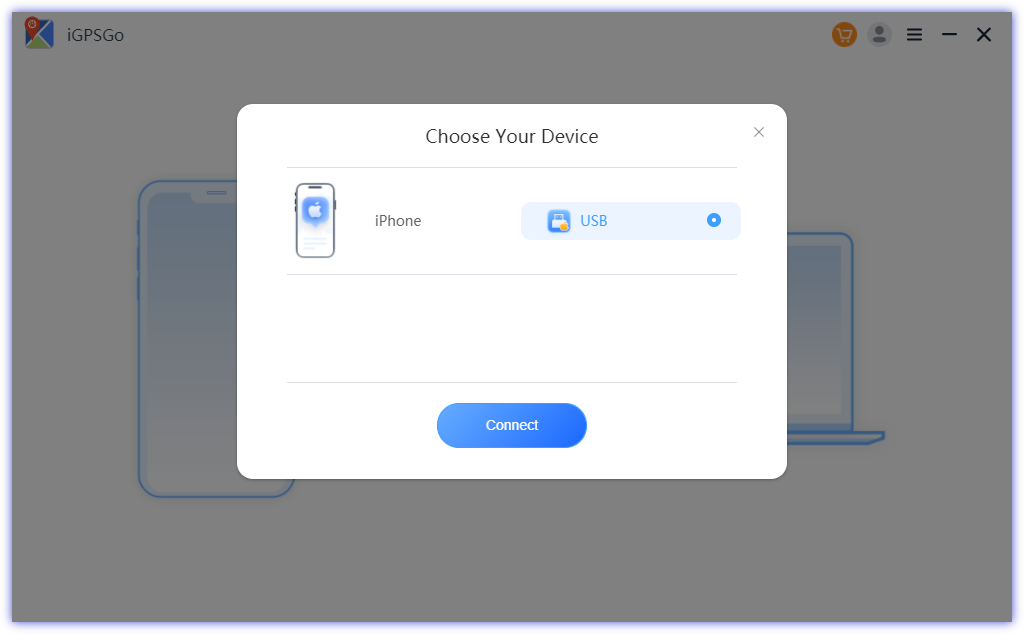
Step 1: Install the iGPSGo monster hunter now spoofer on the PC and then connect the iOS device or Android device to the computer.
Step 2: Enable the Developer mode on the iPhone and then turn on the USB debugging in the Android device.
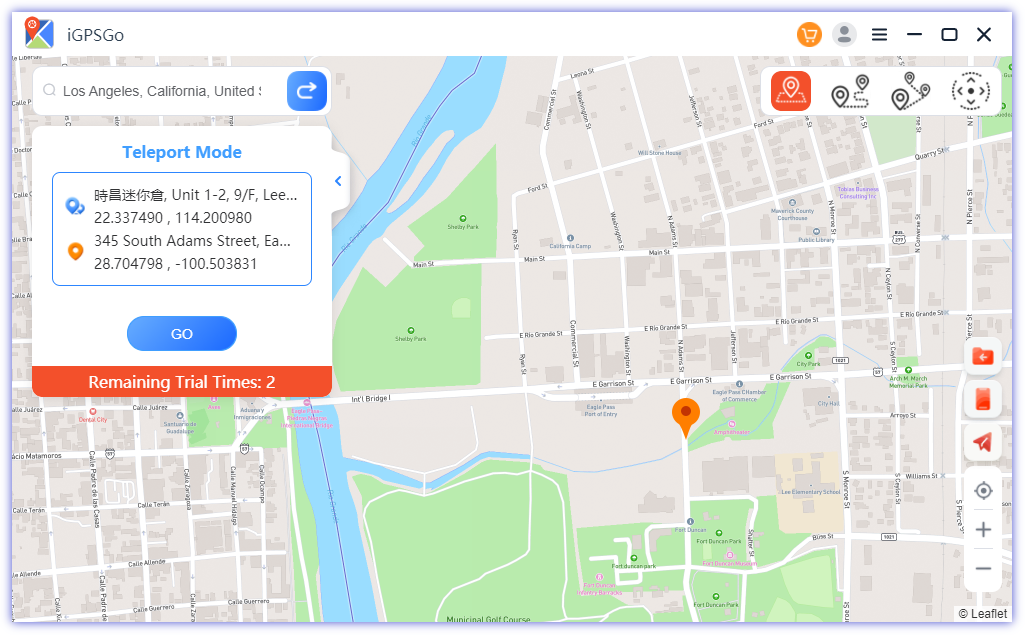
Step 3: Choose the teleport mode of the iGPSGo, select the preferred GPS location for monster hunter now, and hit the Go button. Launch the Monster Hunter now and start playing the game with the GPS location changed. You can also use joystick mode to walk around in Monster Hunter now.
Part 2. MockGo for iOS: check current requirements
MockGo is a highly recommended app for spoofing your Monster Hunter Now GPS location on iOS devices. You can set customized routes for your character, making it easier to navigate in Monster Hunter Now. This feature can be handy for completing in-game tasks or reaching specific locations quickly. MockGo is a tool primarily designed for iOS devices and doesn’t require jailbreaking.
Follow these steps to spoof Monster Hunter Now on iOS with MockGo:
Step 1: Ensure that you have MockGo installed on your computer. You can download it from the official website, choose windows or mac, depending on your computer version.
Step 2: Connect your device to your computer using a USB cable. Ensure you trust the computer on your device when prompted.
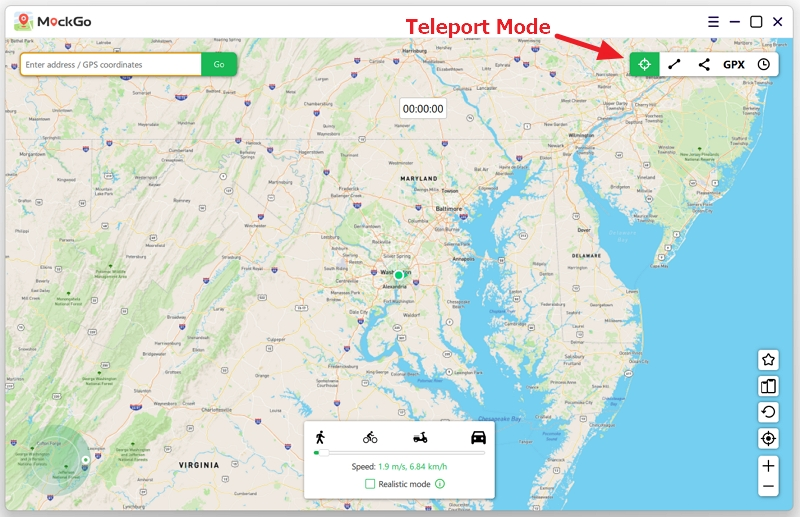
Step 3: In MockGo, you’ll see a map interface. Choose teleport mode. You can search for the Monster Hunter Now location you want to spoof to or enter coordinates manually. After selecting the location, click on the “Move” button to teleport your device to the chosen location.
Step 4: Open Monster Hunter Now on your iOS device. Your in-game character will now be at the spoofed location you set in MockGo.
Part 3. Android GPS joystick apps: check current requirements
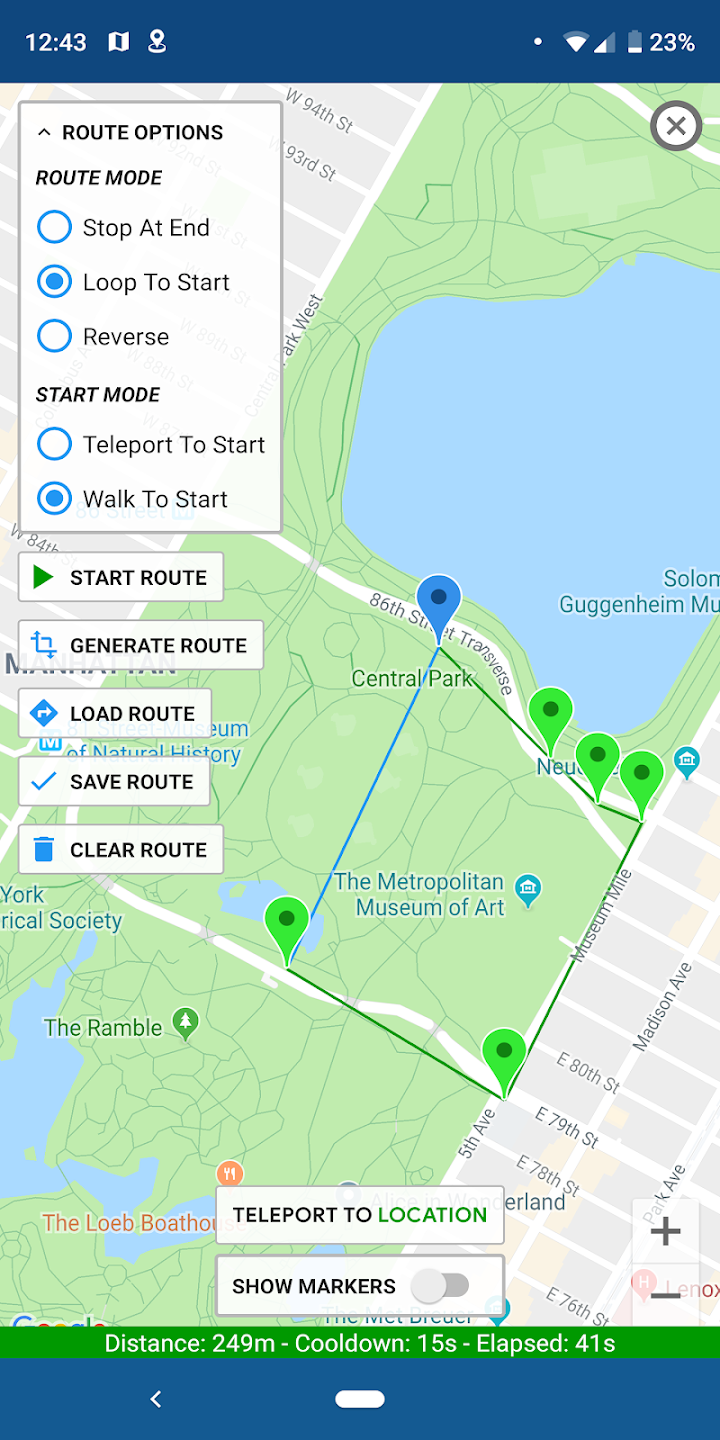
Android users looking for the Monster Hunter Now fake gps joystick without rooting the device can look at the Fake GPS Joystick app by the app ninjas company. Fake GPS Joystick apps allow you to have more control over your in-game location, potentially enabling you to access hard-to-reach areas to hunter monsters without physically traveling to those places.
It is 100% free. So Fake GPS Joystick apps may not always work flawlessly. They can cause glitches, crashes, or errors in the game, potentially making your gaming experience frustrating.
Here’s how to use Monster Hunter Now Fake GPS Joystick app on Android without root
Step 1: Choose a Fake GPS App from google play store, Start the Fake GPS Joystick App and turn on the Developer mode on the android phone setting. In “Developer Options,” enable the “Allow mock locations” option. This allows the fake GPS app to work.
Step 2: After turning on the developer option, you’ll need to start the Fake GPS Joystick App and choose the mock location.
Step 4: Set the Fake Location. Search for the Monster Hunter Now location you want to spoof to or manually enter GPS coordinates. Click on “Set Location” or a similar button to set the fake GPS location.
Step 5: Launch Monster Hunter Now. After setting the fake GPS location, you can launch Monster Hunter Now on your Android device. Your in-game character should now appear at the location you specified using the fake GPS app.
Part 4. Compare Which is the Best Free Monster Hunter Now Spoofer iGPSGo, Mockgo, GPS joystick
| iGPSGo | Mockgo | Fake GPS Joystick | |
| UI | Effortless user interface | Manageable user interface | Manageable user interface |
| Root or jailbreak | GPS location simulation | no jailbreak | no root |
| Version | Desktop app | Desktop app | Mobile app |
| Ban Rate | Account restrictions remain possible. No location tool can promise a zero ban rate. | Account restrictions remain possible. No location tool can promise a zero ban rate. | Account restrictions remain possible. No location tool can promise a zero ban rate. |
| Joystick | Yes | Yes | Yes |
| Support Device | ios and android | only ios | only android |
Part 5. Monster Hunter Now account rules and limitations
Changing the GPS location on the Monster Hunter Now could end up banning the account. However, if you are determined to spoof your GPS location despite these risks, here are some tips to minimize your chances of getting banned:
- You need to ensure that you’re not changing the GPS location on the Monster Hunter too many times a day. Limit your use of GPS spoofing to a minimum. Frequent and extreme location changes are more likely to be flagged as suspicious.
- Don’t use your main account, use your alt account to reduce losses if you got banned for spoofing.
- Account restrictions remain possible. No location tool can promise a zero ban rate.
- Using the original Monster Hunter Now app, without any modifications or cheating, is the surest way to avoid getting banned. Some spoofers who use hacked Monster Hunter Now client will face a high risk.
- A cooldown timer is a reference for elapsed time; it cannot guarantee that an account will avoid warnings, restrictions or bans.
Part 6. What are the benefits of use monster hunter now Fake GPS Joystick
There are multiple benefits of the Monster Hunter Now Spoofer, and a few of the major ones are listed below.
- It allows you to hunter the monsters without walking outside. Spoofing can help players locate and engage with monsters more efficiently, saving time and effort that would otherwise be spent on exploration.
- Location spoofing can make it easier to complete in-game tasks or quests that require visiting various locations. Players can instantly teleport to the required areas.
- Level up your monster hunter now hunter rank fast.
- Spoofing allows you to play Monster Hunter Now from the comfort of your home, regardless of your actual location. This can be convenient for players who have mobility issues or those who cannot access specific locations easily.
FAQs about Free Monster Hunter Now Spoofer with GPS Joystick iOS/Android
1. What is the difference between Pokémon Go and Monster Hunter Now?
Those two games work with two very different IPs. Pokemon GO is a pokemon collection game, while Monster Hunter is a combat-heavy game about hunting monsters, you need use any weapons to kill the monsters. While the world of Pokemon Go will remain inaccessible and static in various areas, the Monster Hunter comes up with dynamic features that will be changed over time. This way, you can enjoy the new experiences with the Monster Hunter, and that’s not the case with the Pokemon.
2. Do ipogo and pgsharp support Monster Hunter Now GPS spoofing?
PGSharp and iPogo don’t support the Monster Hunter Now Spoofing, PGSharp and iPoGo hacks the pokemon go source code, so they only support pokemon go, You can contact them to inquire whether they have any development plans for Monster Hunter Now spoofing.
3. Is it safe to spoof Monster Hunter Now GPS location
Spoofing in Monster Hunter Now is generally against the game’s Terms of Service. If the game’s developers or administrators detect that you are spoofing your location, they may suspend or ban your account. This means you won’t be able to play the game anymore, and any in-game progress or purchases you’ve made may be lost. It has three strikes policy: Strike 1: Warning Strike 2: Suspension Strike 3: Termination
Conclusion
You can take the exciting notes from this post to use the Monster Hunter Now Spoofer efficiently. We have revealed the 3 absolutely gorgeous ways to change the GPS location on the Monster Hunter, and all the listed options are worth your attention.
iGPSGo is a desktop location tool with map selection, route simulation and joystick controls. Changing GPS data does not guarantee that an app will accept the location or that an account will avoid restrictions.

William Hanger is a veteran Pokémon GO player with a passion that dates back to the game’s launch in 2016. Having accumulated vast experience and expertise in the world of Pokémon GO Fake GPS, she already tested 20+ Fake GPS app.